
For almost everything a coach or service provider does in Claude, pick Sonnet and leave the effort setting alone. Move up to Opus when you are thinking through a real business decision, and save the biggest models for long, hard projects. And before you blame the model for a bad answer, start a fresh chat. A long, wandering conversation causes more bad answers than the wrong model ever will.
Which Claude model am I supposed to pick?
A Peaceful Marketing Lab member asked me that last week. She was pointing at the little drop-down below the chat box in Claude, the one that shows Haiku, Sonnet, Opus, and Fable. She'd been using Claude daily for months, had just heard about Fable, and wondered if she should try it.
Most people never change that setting. They don't know what it means, so they use whatever Claude came set to. And when the responses come back underwhelming, they assume that's as good as Claude gets.
Usually it isn't. That little menu is a big part of why Claude feels sharp some days and useless on others. Once you know what it's actually choosing between, you stop guessing.
So that's what this post is. The plain version, for the rest of us. By the end you'll know which model to use for what, when to leave the settings alone, and the first thing to check when Claude gives you something you can't use. That first thing usually isn't a setting at all.
Where to find it
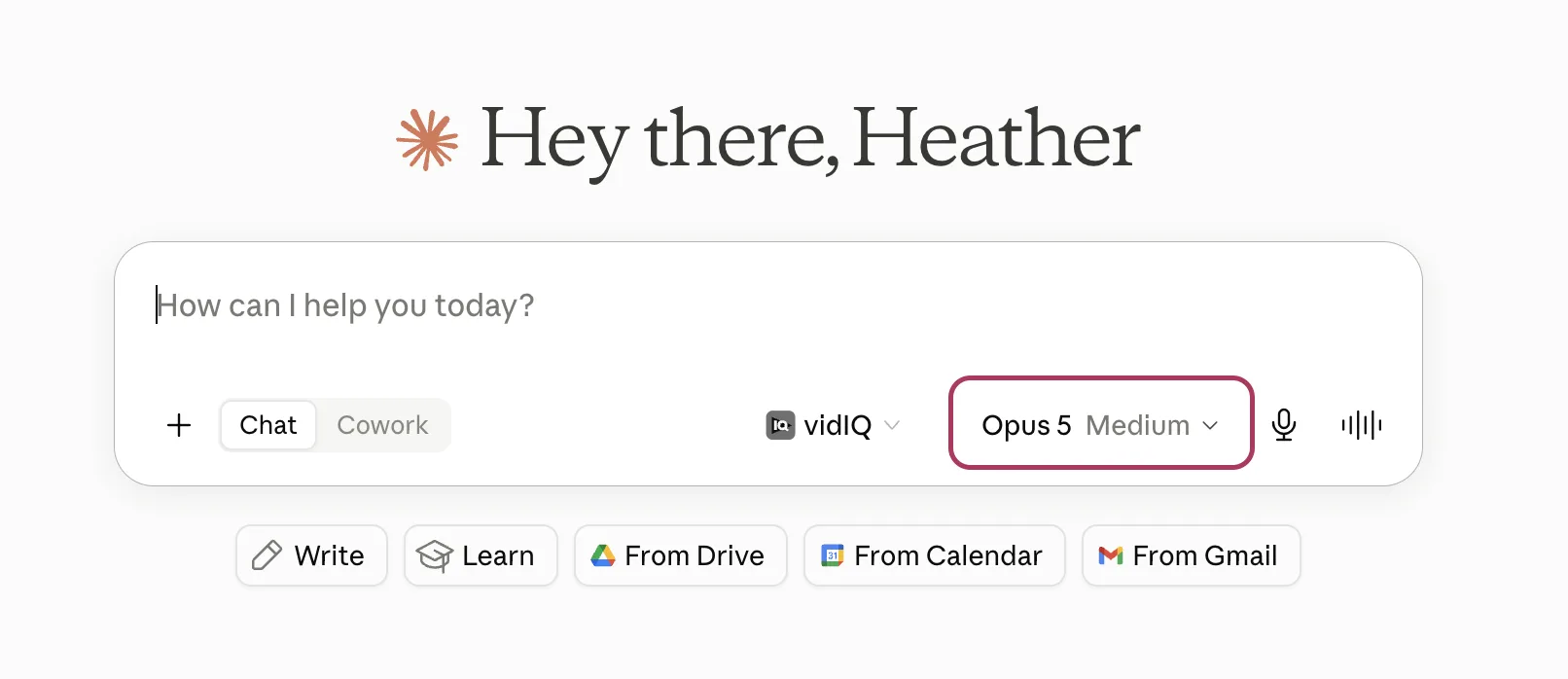
If you've never noticed these settings, they're easy to miss. Open Claude and look along the bottom of the text box, over toward the right. There's a small button showing whatever it's set to right now, something like "Opus 5 Medium."
Click it and the menu opens. At the top are the models: Fable 5, Opus 5, Sonnet 5, Haiku 4.5, each with a one-line note on what it's for. Below them is Effort, which opens its own short list: Low, Medium, High, Extra, Max. Claude even spells out what effort does right there: higher effort means more thorough responses, but it takes longer and uses your limits faster.
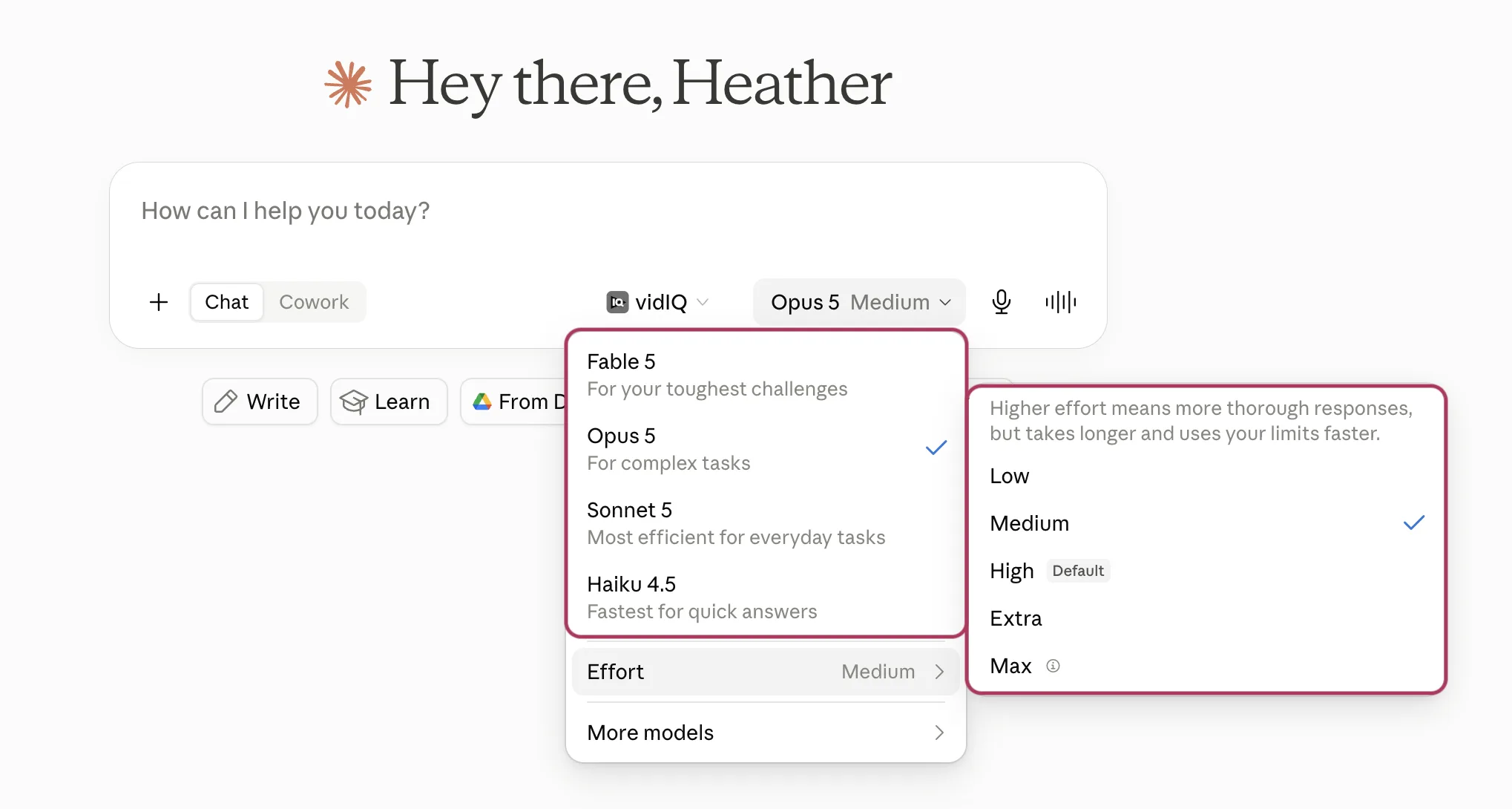
That's the whole control panel. One little button, two settings, and almost no explanation of what either one is for. Let's fix that.
Two settings, two different purposes
You have two settings, and they do completely different things.
The model is how much Claude knows. Each model has its own built-in knowledge, and that can't be changed. You can give it context about your business, but you can't teach it something brand new mid-chat.
Effort is how hard Claude tries. A higher setting means it looks at more, checks its own work more carefully, and gets further into a multi-step task before it stops to ask you something.
Anthropic's own team describes it as knowing more versus trying harder. Think back to school. Some students got top grades because the material came easily to them. Others got there by working hard, doing every scrap of homework and studying late for the final. The model is the first kind of smart, and effort is the second.
The models, in plain words
Haiku is fast and cheap. Quick lookups, reformatting, sorting a list. The work where you want an answer in three seconds and you're not asking it to be clever.
Sonnet is a strong generalist, and it's your daily driver. Most writing, email, planning, and content work. When you're not sure, this is the answer.
Opus is the expert. Reach for it when the problem is hard or the answer isn't obvious: pricing, positioning, a decision with real trade-offs, the kind of "help me think this through" question you'd take to someone who has seen a lot of businesses.
Fable is the specialist who has seen problems almost no one else has. It costs the most, and it's built for long, hard, multi-step work. Save it for the things that need it.
There's a tier above Fable called Mythos that most of us can't access. I don't know much about it, other than that it's powerful enough that Claude keeps it locked away from general users.
Effort, in plain words
Low is fast and lean. Medium is balanced. High is the default on most models, and it's thorough. Above that sits Extra for long, multi-step projects, and Max, which tells Claude to stop worrying about efficiency at all.
About Max: almost nothing you or I do needs it. It's for problems at the far edge of what AI can do, where a wrong answer causes a real problem and you'd rather wait and pay more than get something fast you can't trust. If you ever need it, you'll know, because you'll have tried High first and hit a wall.
Not every model offers every level, and what you see depends on your plan. If an option isn't there, that's why.
Anthropic's own advice is to mostly leave effort alone. The default sits where most people want it. Set it once for the kind of work you do, and then more or less forget about it.
So which do I pick?
| What you're doing | Model | Effort |
|---|---|---|
| Fixing a subject line, a quick rewrite, a fast fact-check | Haiku or Sonnet | Low |
| Drafting a blog post, email, or social caption | Sonnet | Default |
| Turning one video into a week of content | Sonnet | Default |
| Writing something in your voice that has to land | Sonnet or Opus | High |
| Thinking through a business decision | Opus | High |
| Positioning, messaging, strategy | Opus | High |
| Digging through a long, messy document | Opus | High |
| A big research project with a lot of moving parts | Opus or Fable | Extra |
Pick the row that matches your work, not the fanciest option you can access.
Troubleshooting: when Claude lets you down
Before you reach for a bigger model, work out what actually went wrong. Most disappointing answers aren't a model problem at all. Match what you're seeing to one of these.
"Claude feels like it's getting dumber"
This is the most common one, and nine times out of ten the conversation is the culprit and the model is perfectly fine.
Claude doesn't carry memory from one message to the next the way we do. Every time you send one, it re-reads the whole conversation from the top before it answers. As the chat gets long, that has two side effects. It burns through your usage faster, because there's more to re-read every time. And once the conversation gets big enough, Claude starts summarizing the earlier parts to keep up, so the details you gave at the start can get fuzzy or drop off. If the chat went sideways early on, every answer since has been building on that.
The fix is to start a fresh chat, and you don't lose your progress doing it. Ask Claude to summarize the conversation so far, or to write you a short handoff note, then paste that into a new chat with your latest draft. A short chat that changed direction twice will trip Claude up more than a long one that stayed on track.
"It made something up"
When Claude doesn't have a piece of information, it will often fill the gap with something that sounds right instead of admitting it doesn't know. People call this "hallucinating." So a made-up name, date, or number is usually a sign that Claude was working without the facts.
The fix is to hand it the real thing: the document, the actual numbers, the brand notes, the client's own words. Once the fact is in front of it, the guessing stops. A bigger model won't rescue you here, because it can't invent a detail you never gave it.
"It skipped a step or stopped halfway"
This one is usually an effort problem. Claude looked at the task, did part of it, and decided that was enough, or it moved too fast to check its own work. It's rushing more than anything.
Nudge the effort up a level. A higher setting tells Claude to slow down, look at more, and get further through a multi-step task before it stops. Or just say it plainly in the chat: "do all five, not only the first two," or "check your work before you answer."
"It had everything, tried, and still got it wrong"
You gave it the facts, the effort was high, the chat was fresh, and it still came back wrong. This is the rare case where the model itself was the limit. The problem was harder than that model could handle.
Now moving up makes sense: Sonnet to Opus, or Opus to Fable. This is the one situation where a bigger model is the real answer, and it's the least common of the four. Most of the time you never get here, because one of the fixes above solves it first.
I say all this as someone who has absolutely blamed the tool for her own vague instructions.
Bigger isn't the same as better
There's something familiar about the urge to max out every setting just in case.
It's the same instinct that has us posting on five platforms, running three lead magnets, and stacking on one more offer. The belief that more input always makes more output. That if we're not using the biggest, most powerful version of everything, we must be missing out.
Mostly it burns through your usage limits and tires you out for the same result.
Sonnet on the default setting handles the vast majority of what a coach or service provider needs. Reaching for the biggest model every time is a bit like hiring a specialist consultant to answer your email. You can. It's just more than the job needs, and you'll feel it in your time and your usage limits.
So save the expert for the work that calls for one. The rest of the time, the everyday model has you covered.
If you want to go further, here's how to keep AI sounding like you rather than a template, a set of AI marketing prompts you can paste straight in, and a rundown of the best AI tools for coaches beyond Claude.
Picking the model is the easy part
The harder part is knowing what to say, and actually sending it.
That's what the Peaceful Marketing Lab is for. Twice a week, a small group of coaches and service providers bring whatever they're stuck on and leave with a real next step, including how to put AI to work in your marketing without it sounding like a robot. Come see if it's your kind of room.
Common questions
Which Claude model is best for writing?
Sonnet, on the default setting. It handles most writing, email, and content work well. Move up to Opus only when Sonnet isn't quite sounding like you, even after you've given it your voice DNA, or when you're working through strategy.
What's the difference between the model and the effort setting?
The model is how much Claude knows. Effort is how hard it tries. You change the model for harder problems, and you mostly leave effort alone.
Do I need the most expensive model?
No. Most coaches and service providers are well served by Sonnet at the default. The biggest models are built for long, hard, multi-step projects, not everyday writing.
Claude gave me a bad answer. Should I switch models?
Usually not. Start a fresh chat first, then check whether it was missing information (give it the details), rushed (raise the effort), or the problem was simply too hard (then go up a model).
Whenever you're ready, here's how I can help
Start free and go at your own pace. No pressure, ever.
- Free: Keep reading the blog and subscribe on YouTube. I share everything I know.
- DIY: Get the PeacefulBiz app to organize, plan, create, and simplify your marketing.
- Guided: Join the Peaceful Marketing Lab, and let's build together.
- Direct: Book a strategy call for 1:1 help, a custom website, or to decide which program is right for you.
Want the whole framework?
The PEACE Blueprint Guide walks you through all five pillars, with planner pages to build your own peaceful marketing system.
Get the free guide

Heather C. Stephens
27+ years in marketing and 11 helping coaches and service providers get found online without burning out. Founder of Wise Owl Marketing and creator of PeacefulBiz and the PEACE Blueprint.
More about Heather →


Get peaceful marketing ideas delivered to your inbox each week.
One practical idea at a time, written like a note from a friend who happens to know marketing. Read it and try it that afternoon.