
How to Use AI for Content Creation: A Coach’s Guide to Smarter Marketing [2026]
By, Heather Stephens

Originally Published, May 2023. Last Updated, January 2026. This post contains affiliate links.
What if the tool everyone’s using to create more content could actually help you create less, but better content that allowed you to work less, too?
Listen to the podcast summary of this post
This audio podcast summary was generated with AI
View Transcript ⌄
How to Use AI for Content Creation: The 70/30 Rule
[00:00:00] Okay, let’s, uh, let’s be real for a second. It’s Tuesday morning, right? You’re staring at a blinking cursor. Oh, that blinking cursor. Right. You know, you need to get a blog post up, or write that email sequence for your new launch or just post something. Anything. Yeah. But you’re just empty. That’s the dreaded content burnout.
It is. I mean, it’s the silent killer of coaching businesses everywhere. It really is. And usually when we talk about fixing this with ai, the pitch is always the same. It’s, Hey, use this magic robot to do more, write 10 times the content in half the time. SL the zone. Yes. Which ironically usually just leads to more noise.
Yeah. More generic clutter and then more burnout. Just, you know, faster. Exactly. But today we’re doing something a little different. We’re looking at a guide that, well, I promise it the opposite. It’s not about doing more, it’s about doing better while actually working less. Mm-hmm. We’re doing a deep dive into how to use AI for content creation.
A Guide for Coaches 2026 by Heather Stevens, and [00:01:00] that date in the title 2026 is really key here. We’re looking at this from the perspective of where the tech is Now. The tools have matured. We’re talking GPT five, Claude Sonnet 4.5, right? But Stevens argues that even with all this horsepower, the core problem is still there.
How do you use these robots without sounding. Well, like a robot. That is the million dollar question. Yeah. Because if you sound like a robot, nobody’s gonna hire you as a human coach, not for a premium rate anyway. No, Stevens calls her approach peaceful marketing. Which honestly sounds a little too good to be true.
Her whole mission is to move us from fearing AI as this soulless replacement to, to seeing it as a partner, A partner that lets you keep your soul. That’s really the crux of it. So let’s unpack this, because Stevens wasn’t always on board with the AI revolution, was she? Not at all. In fact, she started as a total skeptic years ago, back when the early AI writing tools were first popping up.
Oh, the one-click sales page writers, those are the ones she tried them. And she [00:02:00] hated them. Just total garbage, complete garbage. She felt they lacked empathy, personality, all the nuance a coach actually needs. She basically wrote off AI entirely. Just another fad. I think a lot of us have been there. You type in write me a blog post about confidence and what comes out.
Sounds like a corporate press release written by an alien. An alien who has never felt an emotion. Yes. But her turning point came when she heard a copywriter, Ashlyn Carter describe AI differently. How so? Carter didn’t call it a replacement, she called it a junior copywriter. Okay. I like that distinction.
A junior copywriter. But how does that actually change things? It changes the power dynamic completely. Think about it. If you hire a junior staffer fresh out of college, you don’t tell them go run the entire company strategy. No, of course not. You have them handle the research. You have them write the rough first drafts, you have them do the pious formatting, but they don’t sign off on the final message.
That’s the boss’s job. And in this scenario, you are the boss. You [00:03:00] are the boss, and Stevens realized. Her mistake wasn’t that the AI was bad, it was that her instructions were bad. That old garbage in, garbage out principle. Right? She was giving these vague prompts, like write an article about SEO and then getting a vague trashy results.
Exactly. She has this great metaphor for that mindset shift. She says, most people treat AI like a content vending machine. Yeah, I love that. You put a coin in the prompt. Hmm. And you expect a fully formed perfect Snickers bar of content. To just fall out, which is not how creative work happens. Never. Yeah.
She argues you need to treat AI as a thinking partner. Mm-hmm. And to make that concrete, she uses this kitchen analogy that just clicks the kitchen assistant. Ah, yes. The sous chef. Exactly. So you’re the master chef. The AI is your sous chef. It chops the onions, it measures the flour, it preps everything, which, let’s be honest, are the parts of cooking that take the most time, but don’t really require genius.
Precisely, but you, the chef, you decide the recipe, you add the [00:04:00] seasoning, you taste the sauce and say, you know what? This needs a little more acid. You plate the dish. You plate the dish. The AI creates the bones of the content, but the human has to add the soul. If you try to make the ai, the chef. The food’s gonna taste like school, cafeteria mash Every single time.
Every time. Okay. I’m with you on the mindset, but this leads us right into what I think is the stickiest part of her guide, the debate over the ratio, uh, the 70 30 rule. Yeah. Because the standard advice. And she even mentions Neil Patel here is often let AI do 70% of the heavy lifting and you just tweak the last 30%, the efficiency max approach.
Right. But Steven says, absolutely not. She flips it. She argues for human 70% ai 30. Yeah. And I mean, I have to be the skeptic here for a second if I’m doing 70% of the work. What’s the point? Aren’t we, just back to me writing the whole blog post myself, I thought the whole point was to work less. That’s the pushback everyone gives and it feels counterintuitive.
I get [00:05:00] it. But she makes this really important distinction between typing time and thinking time. Okay. And unpack that. She argues that the 70% you’re doing isn’t the heavy lifting, it’s the high value lifting the AI’s. 30% is the labor, it’s the research, the outlining the grammar checks, formatting, restructuring, all the stuff that takes hours, but is pretty low leverage.
Exactly. The human, 70%, that’s the magic. It’s your stories, your specific client experiences. Your opinions, especially the unpopular ones. It’s your voice. Your tone, your final editorial judgment. Why is that ratio so strict? Why can’t I let the robot do say 50%? It comes down to how these large language models actually work.
Stevens calls it the open book test problem. Okay. When you ask an AI to write something, it scans the internet for everything everyone else has already said on the topic, and it gives you the average. So it’s basically the statistical average of the internet. Correct. And if you let that average be the majority of [00:06:00] your content, your content becomes generic.
It looks just like everyone else’s AI content. And her point is for coaches. If your content looks generic, clients won’t see the value in hiring you. You become a commodity. The human 70% is the only thing that protects your price point. That makes a ton of sense. Okay, point taken. Use the robot for the labor.
Keep the magic for yourself. So let’s get into the nuts and bolts. How does this look in practice? Okay, so she breaks down a specific six step workflow, and what’s really fascinating here is how much she leans on the projects feature in Claude. Right. For those of us who haven’t updated our mental software since 2024, explain why projects matters.
Yeah. Isn’t it just a chat window? No, and this is the game changer. In the old days, you’d have one long chat thread and eventually the AI would drift. It would forget the instructions from the start, right? The memory of a goldfish, you have to keep reminding, Hey, remember I’m a business coach, not a fitness instructor.
Exactly. Projects fixes that. By creating a [00:07:00] permanent context window, you upload your brand voice, guide your product list your SEO data once and every time you open that project, the AI references those documents first. It simulates long-term memory. That’s it. It’s the only way to get consistent results over months of work.
Okay, so step one in her workflow is strategic planning. Mm. She’s using a specific SEO strategist project, right? She loads it with her Google Analytics and search console data, and she’s not just asking for random ideas, she’s asking the AI to. Gaps. Like what? Like look at my data. Find old posts that are stuck on page two of Google, and tell me how to update them to get to page one.
That is so much smarter than just staring at the wall, wondering what to write. It’s data-driven Creativity, okay, than step two is keyword research. She uses a tool called Uber Suggest. But with a major twist for 2026. Okay. She’s not just looking for what people type into Google, she’s looking for questions that other AI tools might cite answers for.
Well, [00:08:00] hold on. Explain that. You’re optimizing for the chat bots. Now. It’s a subtle but massive shift. People used to type best time management tips into Google and get a list of links. Now they ask an ai, how do I manage my time better as a working mom? And the AI synthesizes a direct answer, and it usually cites its sources for that answer.
Exactly. Stevens wants to be that source. The industry is calling it answer engine optimization. Wow. We used to write for algorithms. Now we’re writing for the robots that read the algorithms. It never ends. Okay, so step three is the outline. She goes back to that. SEO strategist ai. And collaborates and collaborates seems to be the key word.
It is. She injects the human element right here. She’ll tell the ai, my audience won’t relate to that angle or insert my story about the time I failed at that launch right here, adding the seasoning before the cooking even starts. You got it. Then step four is the draft. This is where she switches projects.
She moves to a writing partner project in [00:09:00] Claude, and this one is trained on her voice specifically. She’s fed it. Her book manuscripts or best blog posts, but, and this is the part people need to hear, she has a very specific voice training recipe she uses before she lets it write a single word. Ooh, okay.
Give us the recipe. It’s a calibration technique. At the start of a session, she pastes in three samples of her best writing, just the raw text. Then she asks the AI to analyze it. First she says, quote, analyze the tone sentence structure and vocabulary of these samples. Describe my voice back to me. Oh, that’s smart.
So she forces the AI to prove it, understands the pattern before it tries to replicate it. Yes, because if the AI comes back and says. Your style is formal and academic and she knows she’s fun and casual. She knows the instructions need fixing before she wastes time generating a draft. That must save so much editing time later it does.
And once the voice is confirmed, she starts what she calls the dance. The dance. It’s a back and forth. She’ll get a section and say, make [00:10:00] this warmer, or I would never use that phrase or add a transition here. It’s interactive. She never just says, write the post and walks away. And on that note, she has a rule about prompting that I think is brilliant.
Delete button rule. Oh, yes. This is her advice on authenticity. She says, if you read a sentence from the AI and you think, I would never, ever say that, just delete it immediately. Don’t try to accept, don’t try to rewrite it. Just cut it. That’s how you protect your soul. It’s like pruning a tree. You have to cut the dead branches so the real stuff can grow.
Precisely. Okay, so she’s danced with a robot. She has a solid draft. What’s Step five? Step five is the final polish, the human 20%. She moves it outta the AI and into WordPress. This is where she does the final sounds like me. Test adds internal links, chooses images, the final human touches, and then step six.
The cascade. This is the efficiency part. Everyone wants repurposing. She takes that finished high quality blog post and feeds it to a totally different [00:11:00] email marketing project ai. Then she asks us to turn the post into an email, a LinkedIn article, an Instagram carousel, a bunch of tweets. So that one core piece of high quality content where she spent her 70% human effort becomes five or six other pieces all tailored to the platform.
Exactly. And because the source material is good, the repurpose stuff is actually. Good. It’s not just spam and you do it without that mental drain of switching contexts yourself. It really does sound well peaceful when you lay it out like that. It’s less about generating content and more about managing ideas.
Right. You’re the architect. The AI is the builder. We focused a lot on Claude, ’cause that’s her main engine. She does mention a few other tools. Were there any standouts that change how we should think? Well, obviously perplexity for research, if you’re a coach, you cannot afford to hallucinate facts.
Perplexity gives you citations so you don’t look like an amateur crucial. But the one that really points the future is a tool she mentions called Opal Op. I haven’t used that [00:12:00] one. It’s basically for turning text into mini apps. So think about a standard lead magnet. It’s usually a PDF checklist that just sits in your downloads folder and rots guilty.
I have a graveyard of unread PDS on my hard drive. We all do with opal. Steven suggests you can type in your coaching method and say turn this into a budget calculator for freelance. And it builds a working interactive calculator you can embed on your site. So the content isn’t an article anymore, it’s a utility.
Exactly. That is the frontier moving from just reading to using, and AI makes that accessible to people who can’t code. That’s wild. It really expands the definition of what a content creator even is. It does. And she mentions whisk from Google Labs for creating consistent brand images. No more generic stock photos of people shaking hands.
So we got the mindset, the workflow, the tools. But I wanna circle back to the promise, the working less part, because listening to this, setting up projects, calibrating the voice, dancing with the [00:13:00] ai, it sounds like a lot of front loaded work. It is front loaded. That’s undeniable. You have to build the system.
But Stevens argues that once you have your SEO strategist project and your writing partner project set up, the energy savings are huge. It’s the difference between building a house and just pitching a tent every single night. That’s a great analogy, and more importantly, it cures the blank page. Panic.
That panic is what drains us. Starting with a structure or a data backed idea, it means you’re always in motion. You’re editing and refining, which is so much easier on the brain than creating from zero. That’s the peaceful part of peaceful marketing. It is. And remember her warning. The coaches who burn out on AI are the ones who expect it to replace their thinking.
The ones who thrive use it to extend their thinking. I love that. Extend your thinking. It leads to her final piece of wisdom, which she calls the BYOB principle. Bring your own beer. Bring your own brain. Even better though. Sometimes I need the beer too. Fair enough. But the point is AI is [00:14:00] the builder. You must be the architect.
If you stop being the architect, the house falls down. Or worse, it looks exactly like every other house on the block. And in 2026, looking like every other house is a death sentence for a business. It really is. We are in a world just flooded with generic, average machine generated content. Stevens makes this profound point.
Your specific human imperfections, your weird stories, your soul, those aren’t just nice to haves anymore. They’re your only competitive advantage. You’re only one that is powerful. The thing that makes you inefficient, your humanity is actually your biggest asset. Precisely. So for the listener who’s feeling a little overwhelmed by all this, yeah.
What’s the one next step? Stevens advises this. Don’t try to build the whole factory today. Pick one task. Maybe it’s just using that voice training prompt we talked about. Paste your writing into Claude and just see if it can understand. You just dip a toe in. See how it feels. See if it gives you that junior copywriter vibe.
If it helps, keep [00:15:00] it. If it drains you, drop it. Simple as that. Well, this has been a fascinating look to where we’re all headed. Yeah. It’s comforting to know that even with GPT five, we humans are still the main event. We’re the chefs, they’re just chopping the onions. I am never gonna look at chat GPT the same way again.
I’m just gonna see it holding a tiny knife and an onion. Just make sure you supervise it so it doesn’t cut itself. Exactly. Thanks for diving in with us. Now, here’s a thought to leave you with. If AI can replicate the average of all human knowledge, what is the one thing you know or have experienced that is so unique it isn’t in the average?
Find that and you’ve found your voice. That’s the key. Thanks for listening to the deep dive. We’ll catch you on the next one.
Here’s something I never expected to say: AI has become one of my favorite business partners.
Not because it writes my content for me. It doesn’t. Not because it’s replaced my thinking. It hasn’t. But because it’s fundamentally changed how I approach the parts of content creation that used to drain me, and freed me up for the parts that actually matter.
If you’re a coach or service provider trying to show up consistently with valuable content, and feeling like there aren’t enough hours in the day, AI tools might be exactly what you need.
Not to replace your voice. Not to automate your authenticity. But to handle the parts of content creation that drain your time and energy, so you can focus on what only YOU can share: your stories, your insights, your perspective.
I’ve been using AI in my content creation since early 2023, and the tools have evolved at a pace I couldn’t have predicted. What started as clunky experiments with basic prompts has become an essential part of how I create blog posts, emails, social media content, and more, without sacrificing quality or burning out.
In this guide, I’ll share exactly how I’m using AI for content creation in 2026, including:
- The best AI tools for coaches (and which ones to skip)
- The 70/30 Rule for human-AI collaboration
- How to use AI without losing your authentic voice
- Practical workflows you can start using today
- The prompting secrets that get better results
Let’s dive in.
Discover What’s Holding You Back in Your Marketing
Before we dive into today’s strategies, it helps to know where YOU naturally thrive in marketing, and where you might be overcomplicating things.
Take the Peaceful Marketing Assessment
This free 5-minute assessment reveals your unique marketing profile and shows you exactly where to focus your marketing efforts based on your strengths, your business stage, and your capacity.
You’ll discover:
- Your natural marketing strengths (so you can lean into them)
- Where you’re likely overcomplicating things
- The ONE area to focus on next for the biggest impact
- A personalized action plan based on your results
Quick Start: AI Content Creation Prompts
Want to skip ahead? Here are the prompts from this guide:
- Prompt 1: Train AI on Your Voice
- Prompt 2: Brainstorm Content Ideas
- Prompt 3: Create a Blog Post Outline
- Prompt 4: Write a Blog Post Draft
- Prompt 5: Refine a Section That Doesn’t Sound Like You
- Prompt 6: Turn a Blog Post into an Email
- Prompt 7: Repurpose for Social Media
- Prompt 8: Analyze What’s Working
- Pro Tip: Build a Prompt Library
Or keep reading for the full system.
The TL;DR (Quick Summary)
Don’t have 10 minutes? Here is the “Peaceful Marketing” shortcut to how to use AI for content creation:
Shift Your Mindset: Treat AI as a thinking partner, not a content vending machine. Use it to brainstorm and structure, but keep your human “Brand Voice” as the final filter.
The 70/30 Rule: You bring 70% of the value (your stories, expertise, perspective, and editorial judgment). AI handles 30% (research, structure, first drafts, reformatting).
Data-Driven Planning: Feed the AI your actual Google Search Console data. This ensures you are writing about what your audience is actually searching for, not just what’s trending.
AI Alignment: Give the AI context, like samples of your writing, your ideal client profile, and offer information, the goals of your content, etc.
The 6-Step Workflow: Our proven process moves from Data Analysis and Brief Creation to AI-Assisted Drafting and Human Polishing.
The Goal: Create better content in less time, so you can spend more time coaching and less time staring at a blinking cursor.
Table of Contents

My Journey from AI Skeptic to AI Partner for Content
I wasn’t quick to warm up to the idea of using AI in my business.
When I first heard about AI writing tools several years ago, I signed up for a popular platform that promised to write conversion-focused sales pages, emails, and more. The results? They lacked personality, empathy, and creativity. Plus, the content didn’t sound anything like me.
I ditched the tool and wrote off AI as another tech fad.
Then something changed.
Earlier in 2023, I heard one of my favorite copywriters, Ashlyn Carter, describe how they were using ChatGPT like a “junior copywriter” to handle initial research and first drafts. That mindset shift changed everything for me. I stopped expecting AI to replace my thinking and started treating it as a capable assistant.
The difference was night and day.
But I’ll be honest, I made mistakes along the way. The first results I got from ChatGPT were garbage. Not because the tool was bad, but because I was giving it garbage prompts.
My first prompts looked like this:
“Please write me an article about SEO.”
Vague input, vague output.
Now my prompts look more like this:
“I’m a marketing coach for service providers. I want to create a blog post that introduces SEO to coaches who know nothing about it. The goal is to help them understand how SEO can generate website traffic without constant social media posting. Please write this in a warm, encouraging voice at an accessible reading level. Include practical examples coaches can relate to, and end with an invitation to take my Peaceful Marketing Quiz. Here’s part of the transcript from a group coaching session where I was teaching on SEO, that you can pull content from.”
Same tool. Completely different results.
Here’s what I’ve learned after two years of experimenting: AI is a co-creating thinking partner, not a vending machine. When you treat it like a vending machine, insert request, extract content, you get generic, forgettable output. When you treat it like a thinking partner, you get something you can actually use.
The Right Mindset: AI as Assistant, Not Replacement
Before we get into the tools, let’s address the elephant in the room: Can AI really help you create content without making everything sound robotic and generic?
Yes. But only if you approach it correctly.
One of my Peaceful Marketing Lab members who is a writing coach put it perfectly:
“Even though it’s very good with writing, I don’t want to use it really for writing, because it makes me feel fraudulent.”
She’s right to feel that tension if you’re using AI as a replacement for your thinking. But here’s the reframe that changes everything:
AI creates the bones. You add the soul.
Think of AI like a kitchen assistant who preps all the ingredients. They can chop, measure, and organize, but YOU decide the recipe, add the seasonings, and plate the final dish. The result should taste like YOUR cooking, not a generic recipe.
Every piece of AI-assisted content needs:
- Your stories: AI can’t share that embarrassing moment with a client that taught you something important
- Your opinions: AI plays it safe; your unique perspective is your competitive advantage
- Your examples: Real situations from your coaching practice
- Your voice: The specific words and phrases that sound like YOU
When you understand this, the guilt disappears. You’re not cheating or being fraudulent. You’re using a tool to handle the tedious parts so you can focus on what only you can provide.
The 70/30 Rule for Human-AI Collaboration
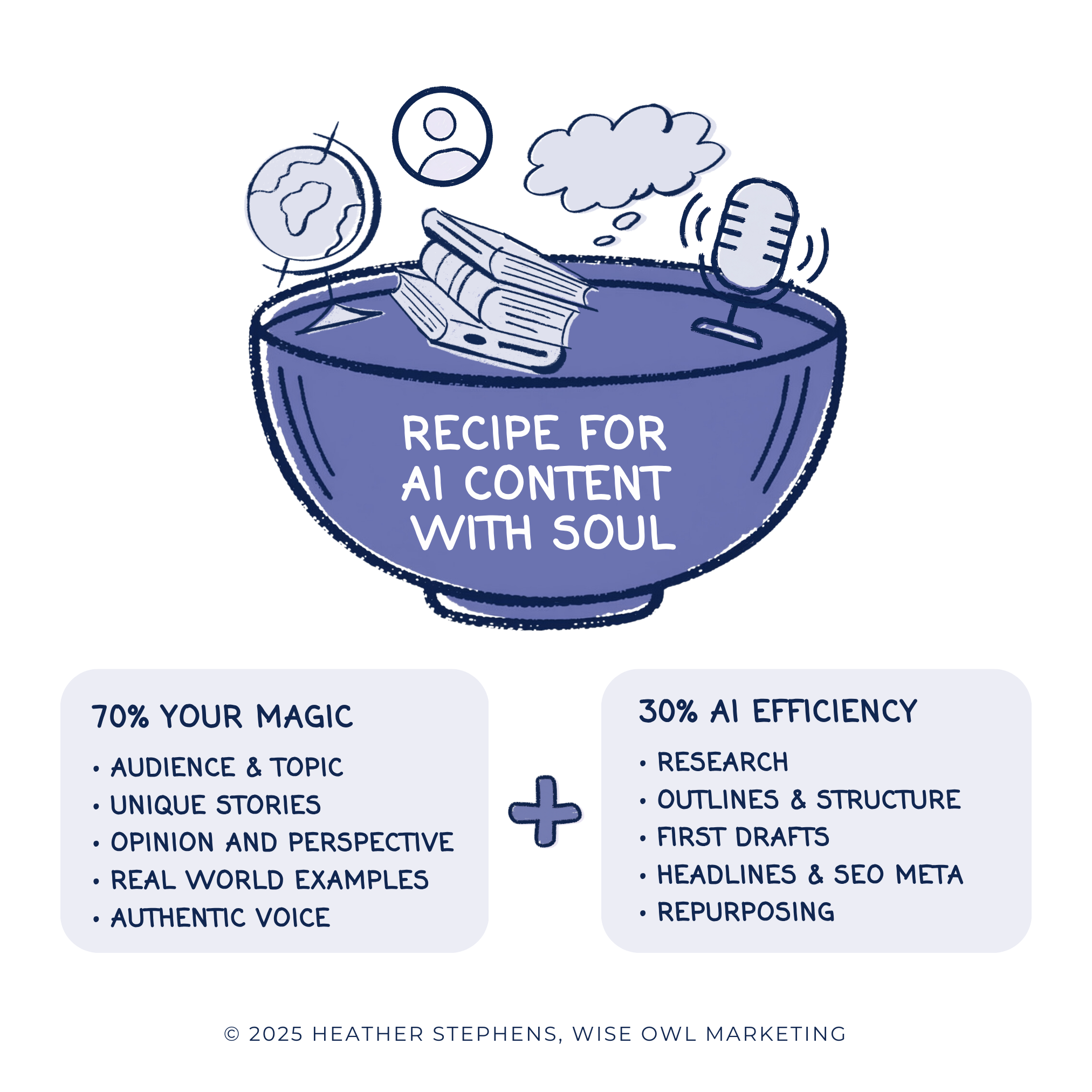
So Neil Patel, the founder of Ubersuggest, recommends that you let AI do 70% work, and you bring 30% of your own human touch to your content.
I disagree with his recommendation. Here’s why…
When you ask AI to write a post on a topic, it treats your request like an open-book test. It scans the internet for what other people have written about the topic and pulls from its own language database to give you a response.
But instead of the content being your own thoughts, ideas, and perspective, it’s a generic average of all the content published on the internet. You end up with content that sounds like everyone else’s AI-generated content.
If AI can do that for you, I guarantee it’s doing the same thing for your potential client in their own chats with AI. And if those generic responses from ChatGPT were enough, your clients wouldn’t be looking for a coach.
Here’s what to do instead:
- Bring 70% of your own magic and value to your content
- Let AI handle the other 30%, the labor to get it packaged and published
Think about it. We do business with people we like and trust, right?
Your clients trust you because of your unique human perspective. You have made the mistakes, felt the feelings, learned life’s lessons, and gained the wisdom to be able to help them through their struggles.
Give AI your frameworks, ideas, and perspectives first and ask it to help you refine them. Ask AI to point out the gaps in your thinking and help you with the deeper research to help you understand your clients, improve your positioning, and set yourself apart from the average.
| 70% Your Magic (Value) | 30% AI Labor (Efficiency) |
|---|---|
| Strategy and why | Research and data gathering |
| Frameworks and methods | Initial outlines and structure |
| Stories and experiences | First drafts of sections you’ve outlined |
| Your opinions and perspective | Reformatting content for different platforms |
| Your voice and tone | Grammar and clarity suggestions |
| Full editorial judgment | Generating ideas for headlines, subject lines, etc. |
The Result: You end up with content that’s genuinely yours, created quickly and efficiently.
The coaches who burn out on AI are the ones who expected it to replace their thinking. The coaches who thrive with AI are the ones who use it to extend their thinking.

The Best AI Tools for Content Creation: A Guide for Coaches in 2026
Note: AI tools evolve rapidly. This list reflects what’s working well as of early 2026, but the landscape shifts constantly. The principles matter more than the specific tools.
Before we get into the method, let me walk you through the tools I’m actually using and which ones my clients love.
Tier 1: The Essential Writing Assistants
These are the workhorse tools that most coaches will find helpful.
Claude AI for Coaches (Anthropic)
Best for: Long-form content, nuanced writing, detailed analysis, maintaining voice
Claude has become my primary AI partner for all content creation. The latest models, including Claude Sonnet 4.5 and Claude Opus 4.5, are remarkably capable at maintaining context over long documents and adapting to your voice.
What sets Claude apart for coaches:
Projects feature: You can create dedicated workspaces with your brand voice samples, ideal client profiles, and methodology documentation. Claude remembers this context across conversations, so you don’t have to re-explain who you are every time.
Memory: Claude now remembers information from past conversations within a project, which means your AI partner actually learns your preferences over time. When I started using this feature, it felt like the difference between working with a new hire every day versus a long-term collaborator who knows your style.
Deep Research: For complex topics, Claude can conduct comprehensive research, synthesizing information from multiple sources. This feature is particularly useful for creating data-backed content.
Inside the Peaceful Marketing Lab, we help members set up custom Claude projects to plan and create their video scripts, podcast scripts, SEO-rich blog posts, and social media content that are written in their voice, pulling from their wisdom, and promoting their offers. I’ve also helped members create what I call a “Visionary Coach” using Claude, an AI partner trained to help them reflect on their business, analyze their metrics, and create strategic plans. The results have been transformative.
Cost: Free tier available; Pro is $20/month
How coaches use it: Write complete blog post drafts, create detailed course outlines, analyze coaching transcripts for patterns, develop frameworks, maintain consistent voice across content
ChatGPT for Coaches (OpenAI)
Best for: General content creation, brainstorming, multimodal tasks
ChatGPT, now powered by GPT-5 (released August 2025), remains one of the most versatile AI writing tools available. The newer models provide faster responses, better reasoning, and built-in web search for current information.
One of my favorite features is Custom GPTs, which you can use to create specialized assistants trained on your style and methodology. If you prefer ChatGPT’s interface, this gives you similar customization to Claude’s Projects.
GPT-5 introduced several improvements that matter for content creators: better long-form writing capabilities, improved instruction following, and significantly reduced hallucinations. The “thinking” modes let you choose between faster responses for simple tasks or deeper reasoning for complex content.
Cost: Free tier available; Plus is $20/month; Pro is $200/month
How coaches use ChatGPT: Draft blog outlines, create social posts from existing content, brainstorm email subject lines, generate client testimonial questions, create workshop agendas, and image generation for blog graphics
Google Gemini for Coaches
Best for: Research, integration with Google Workspace
If you’re deep in the Google ecosystem, Gemini is worth exploring. It integrates directly with Google Docs, Sheets, and Gmail, making it easy to draft emails or documents without switching between tools. Gemini also has strong web search capabilities built in.
Cost: Free tier available; Advanced is $20/month
How coaches use Gemini: Research topics, draft emails directly in Gmail, analyze spreadsheet data, summarize documents
Pro Tip: If you want to stay ahead of the curve and try tools before they hit the mainstream, keep an eye on Google Labs. It’s where Google shares its latest experiments, giving us a playground to test new ways of creating and connecting.
Here are some of the tools I’m having fun playing with in Google Labs at the time of publishing this article (January 2026):
- Whisk: This is a fantastic image generator for maintaining a consistent brand. You can upload your own photos or use specific prompts for setting and style to create custom AI images that actually fit your vibe.
- Opal: A powerful tool for non-coders that turns plain text into mini-apps. I’ve been testing this to see if it can help coaches create interactive, AI-powered lead magnets for their audiences.
- Pomelli: This tool scans your website to generate branded social media posts. While the designs are still a bit basic, it has huge potential for streamlining your repurposing workflow.
Peaceful Note: These tools are experimental and not always perfect. Feel free to play with them if they sound fun to you. Skip them if they don’t.
Tier 2: Specialized AI Content Creation Tools
These tools excel at specific tasks and can complement your main writing assistant.
Perplexity AI
Best for: Research with citations, fact-checking
Perplexity has become one of my go-to research assistants. When I’m writing a blog post that needs statistics or expert quotes, Perplexity is where I start. It provides citations for everything it finds, making it easy to verify and properly attribute information.
Cost: Free tier available; Pro is $20/month
How coaches use it: Research statistics for blog posts, find current data, verify claims, discover expert opinions on topics
Microsoft Copilot
Best for: Users in the Microsoft ecosystem
If you’re already using Microsoft 365, Copilot integrates directly into Word, PowerPoint, Outlook, and Excel. It’s particularly useful if you’re creating presentation slides or working with documents in Word.
Cost: Included with Microsoft 365; Copilot Pro is $20/month
How coaches use it: Draft Word documents, create PowerPoint presentations, summarize long emails
Tier 3: Visual and Multimedia AI
Content isn’t just words. These tools help with the visual side.
Canva (AI Features)
Best for: Graphics, presentations, video editing
If you’re already a Canva user, you might not realize how many AI features you have access to. They’ve added dozens of AI-powered tools, including:
- Magic Write: Generate text content directly in your designs
- Magic Eraser: Remove unwanted elements from images
- Magic Edit: Replace or modify parts of images
- Magic Design: Upload an image and let Canva create editable design templates
- Beat Sync: Automatically align video footage to music (perfect for Reels and TikToks)
- Text to Image: Generate custom images from descriptions
The AI features in Canva Pro are genuinely impressive and continue to improve.
Cost: Free tier available; Pro is $12.99/month (worth every penny)
How coaches use it: Create social media graphics, design lead magnets, edit images for blog posts, create presentation slides
Descript AI Video Editing
Best for: Video and audio editing
If you’re creating video or podcast content, Descript (affiliate link) is a game-changer. You can edit audio and video by editing text, literally delete words from the transcript, and they disappear from the recording. Plus, AI-powered features like filler word removal and Studio Sound (which makes any recording sound professional) save hours of editing time.
Cost: Free tier available; Creator is $12/month
How coaches use it: Edit podcast episodes, create video content, generate transcripts, remove filler words, improve audio quality
Here’s a blog post about what I love about Descript for time-strapped coaches.
A Note on AI Tool Overload
Here’s something important: you don’t need all of these tools.
Start with ONE. Get comfortable with it. Learn its strengths and limitations. Then consider adding others only if you have a specific need.
For most coaches just getting started with AI, I recommend:
- Claude or ChatGPT for writing (try both free tiers and see which you prefer)
- Canva for visuals (you probably already have this)
That’s it. You can build an entire content creation system with just those two tools.
The peaceful approach isn’t about having every tool. It’s about mastering the tools that serve your workflow.
My Workflow, How I Use AI for Content Creation (Specifically, Claude Projects)
Here’s exactly how I create blog content now. It’s a system that took me two years to refine, and it’s changed everything about how I approach content.
6 Steps to Create Content with AI
Total Time: 1 hour
Step 1: Strategically Plan Content with AI SEO Strategist – Custom Claude Project
I have a Claude Project I call my “SEO Strategist.” This isn’t just a chat; it’s a specialized AI partner that has access to:
✔️ Every blog post I’ve written
✔️ My Google Analytics data
✔️ My Google Search Console data
I use this project for two things:
Finding posts to update: I’ll ask something like, “Based on my search console data, which posts are ranking on page 2 that could move to page 1 with some updates?” or “Which older posts are still getting traffic but have outdated information?”
Brainstorming new content: “Based on the gaps in my content library and what’s performing well, what topics should I write about next?” Because it knows my entire content history, it can suggest topics I haven’t covered yet that align with
Step 2: Dive Into Keyword Research in UberSuggest
Once I have a topic direction, I take it to UberSuggest for keyword research. I’m looking for two things:
1. Traditional search keywords: What are people typing into Google?
2. Questions for AI citations: What questions are people asking that AI tools might answer? (This is increasingly important as more people use ChatGPT, Claude, and Perplexity for research.)
My goal is to find relevant keywords that have a higher search volume and lower competition.
I export this research so I can bring it back to Claude.
Step 3: Develop a Content Outline with AI (Back to SEO Strategist)
I return to my SEO Strategist project with my keyword research and ask it to analyze the research and help me identify keywords I should target. Then we use these keywords to create an outline for the post. This is where the real collaboration begins.
We go back and forth. I might say:
“This section doesn’t fit my PEACE framework. How could we restructure it?”
“My audience won’t relate to that angle. What if we approached it from [different perspective]?”
“I want to include my story about [specific experience]. Where would that fit best?”
Once the outline feels right, I ask my SEO Strategist to write a detailed prompt for creating the draft. This prompt includes all the context, the outline, the keywords to include, the tone I want, and the stories I plan to add.
Step 4: Drafting Content with My AI Writing Partner (Another Claude AI Project)
Here’s where the magic happens.
I have a separate Claude Project that I’ve trained specifically to write like me. This project has absorbed my book manuscript, my best blog posts, and examples of my voice. I use it for all my long-form writing, my book, blog posts, and anything substantial.
I give this project the detailed prompt from my SEO Strategist, and it writes the first draft.
Then we dance.
That’s honestly what it feels like, a dance. I’ll read through and say:
“This paragraph doesn’t sound like me. Can you please add this ___ and rewrite it more conversationally?”
“I wouldn’t use that phrase. Try something warmer.”
“This section needs a ‘Take Action’ step, that’s part of my framework. Suggest they do this___.”
“Add a transition here that connects this back to peaceful marketing.”
We go back and forth until the post is about 80% there.
Step 5: Final Polish in WordPress
When the draft hits 80%, I move it into WordPress. This is where I:
✔️ Add my final personal touches
✔️ Insert images and formatting
✔️ Optimize meta descriptions and alt text
✔️ Do my final read-through for anything that still doesn’t sound like me
✔️ Add internal links to related posts
The last 20% happens in the actual publishing environment, where I can see how it will look and make those final tweaks.
TIP: I create most of my images in Canva or with the new Google Lab tool called Whisk.
Step 6: Repurposing for Email and Social Media (The Cascade)
Once the post is live, I take it to my Claude Email Marketing project and ask it to write an email for my list. This project knows my email voice (slightly different from my blog voice – less verbose), my typical email structure, and how I like to introduce new content.
If I were active on social media, I’d have separate Claude Projects for each platform, each trained on that platform’s best practices and my specific voice/strategy for that channel.
One blog post could cascade into:
✔️ An email to my list
✔️ A LinkedIn article
✔️ An Instagram carousel
✔️ A series of tweets
✔️ A Pinterest pin description
Same core content, adapted for each platform’s unique requirements, without me having to context-switch or remember each platform’s best practices.
Tools:
- AI Writing Tool: ChatGPT (Custom GPT) or Claude (Custom Projects): SEO analysis, brainstorming, and content drafting
- Analytics Tools: Google Search Console and Google Analytics for blog SEO data analysis
- Keyword Research Tools: Ubersuggest: for researching keywords and AI search questions
- Creative Tools: Canva and Whisk for creating blog images and graphics
Materials: Brand Voice & Tone Guidelines Ideal Client Persona Offer Details / Product Knowledge
This process could easily be adapted for any type of long-form content like YouTube videos, Podcast scripts, show notes, etc.
Why Multiple Projects Instead of One?
You might wonder why I use separate Claude Projects instead of one giant project that does everything. Here’s why:
Specialized context = better output. My SEO Strategist is loaded with analytics and keyword data. My Writing Partner is loaded with my voice and style examples. Each project excels at its specific job because it has the right context for that job.
Cleaner conversations. When everything’s in one project, conversations get muddied. Did I want strategic advice or a draft? With separate projects, the purpose is always clear.
Easier to maintain. I can update my Writing Partner with new examples of my voice without cluttering my SEO data. Each project stays focused.

Copy-and-Customize These AI Prompts for Content Creation
These prompts are starting points; customize the bracketed sections to fit your business, voice, and audience.
Prompt 1: Train AI on Your Voice
Use this at the start of a new project or conversation to establish your style:
"I'm a [TYPE OF COACH/SERVICE PROVIDER] who helps [SPECIFIC AUDIENCE] achieve [SPECIFIC TRANSFORMATION]. My brand voice is [WARM/DIRECT/PLAYFUL/PROFESSIONAL, pick 2-3 descriptors]. I avoid [JARGON/HYPE/CORPORATE SPEAK/etc.].

Here are three examples of my writing that capture my voice well:

[PASTE EXAMPLE 1]

[PASTE EXAMPLE 2]

[PASTE EXAMPLE 3]

Please analyze these examples and identify the key characteristics of my writing style, tone, sentence structure, phrases I use, how I open and close pieces. Reference this style in everything you help me create."
Prompt 2: Brainstorm Content Ideas
"Based on what you know about my business and audience, I need content ideas for the next [TIMEFRAME]. My audience struggles with [TOP 3 PAIN POINTS]. They want to achieve [TOP 3 DESIRES]. I've already written about [TOPICS YOU'VE COVERED RECENTLY].

Give me 10 blog post ideas that:

Address problems my audience is actively searching for solutions to

Align with my expertise in [YOUR SPECIALTY]

Could be found through Google or AI search

For each idea, include a working title and one sentence about the angle I'd take."
Prompt 3: Create a Blog Post Outline
"I want to write a blog post about [TOPIC]. My target keyword is [KEYWORD]. This post is for [SPECIFIC AUDIENCE] who are struggling with [SPECIFIC PROBLEM].

The post should:

Be approximately [WORD COUNT] words

Include a compelling hook that speaks to their pain point

Provide actionable advice they can implement

End with [YOUR DESIRED CTA, e.g., "an invitation to take my quiz"]

My framework is [YOUR FRAMEWORK NAME], specifically, this post relates to [WHICH PART OF YOUR FRAMEWORK].

Create a detailed outline with:

A working headline (give me 3 options)

Section headers

Key points to cover in each section

Where I should insert personal stories or client examples

A suggested meta description"
Prompt 4: Write a Blog Post Draft
"Using the outline we created, write a complete first draft of this blog post.

Writing guidelines:

Use my voice (warm, conversational, like I'm talking to a friend who happens to need this advice)

Short paragraphs, rarely more than 3-4 sentences

Include subheadings every 200-300 words for scannability

Avoid jargon and corporate-speak

Mark places where I should add [PERSONAL STORY] or [CLIENT EXAMPLE] with brackets

Include a "Take Action" step readers can implement immediately

Target keyword: [KEYWORD] Secondary keywords to include naturally: [LIST 3-5]"
Prompt 5: Refine a Section That Doesn’t Sound Like You
"This section doesn't sound like me: [PASTE SECTION]

The problem is [IT'S TOO FORMAL / TOO GENERIC / MISSING MY PERSPECTIVE / TOO LONG / etc.].

Rewrite it to be more [CONVERSATIONAL / DIRECT / WARM / SPECIFIC]. Remember, I tend to [USE SHORT SENTENCES / ASK RHETORICAL QUESTIONS / SHARE VULNERABLE MOMENTS / etc.]. I would never say [PHRASE THAT FEELS OFF]."
Prompt 6: Turn a Blog Post into an Email
"Here's a blog post I just published: [PASTE POST OR SUMMARY]

Write an email to promote this post to my list. My email style is:

Subject lines that create curiosity without being clickbait

Opening with a relatable moment or question

Brief, usually 150-250 words

One clear CTA

P.S. line that adds a personal touch or secondary CTA

Give me 3 subject line options and the email body."
Prompt 7: Repurpose for Social Media
"Here's a blog post I want to repurpose for [PLATFORM]: [PASTE POST OR KEY POINTS]

Create [NUMBER] posts for [PLATFORM] based on this content. For context:

My [PLATFORM] voice is [SLIGHTLY MORE CASUAL / MORE PROFESSIONAL / etc.] than my blog

My audience on this platform cares most about [WHAT RESONATES THERE]

Posts that perform well for me are [DESCRIBE YOUR TOP-PERFORMING CONTENT]

Format each post correctly for [PLATFORM], including any hashtag suggestions."
Prompt 8: Analyze What’s Working
"Here's data from my last [TIMEFRAME] of content: [PASTE ANALYTICS OR DESCRIBE PERFORMANCE]

Help me identify:

What topics/formats are resonating most?

Any patterns in my top-performing content?

Gaps or opportunities I might be missing?

Which underperforming content might be worth updating vs. abandoning?

Based on this analysis, what should I focus on for my next quarter of content?"
Pro Tip: Build a Prompt Library
Save your best prompts somewhere you can access them quickly. I keep mine in a simple Google Doc organized by task type. When a prompt works well, I refine it and save the updated version. Over time, you’ll build a personalized toolkit that makes content creation dramatically faster.
The 10 Types of Content AI Can Help You Create
AI can assist with virtually any type of content, but here’s where coaches find it most useful:
- Blog posts: Outlines, drafts, research, editing suggestions
- Email sequences: Welcome sequences, launch emails, nurture content
- Social media posts: Repurposed content, caption ideas, hashtag research
- Video scripts: YouTube outlines, talking points, introductions
- Podcast outlines: Episode structures, guest questions, show notes
- Lead magnets: Checklists, guides, workbooks, quizzes
- Sales pages: Section drafts, headline options, objection handling
- Course content: Module outlines, lesson structures, worksheets
- Client communications: Onboarding emails, check-in templates
- Website copy: About page drafts, service descriptions, testimonial requests
The key is knowing when to lean on AI and when to write yourself. Personal stories, strong opinions, and anything that requires your unique expertise should come from you. Structure, research, first drafts, and reformatting are where AI shines.
Prompting Like a Pro: Get Better Results
Your results from AI are only as good as your prompts. Here are the prompting secrets I’ve learned:
Be Specific About Who You Are
Instead of: “Write a blog post about marketing.”
Try: “I’m a business coach for introverted service providers. Write a blog post about marketing strategies that don’t require constant social media presence.”
Tell AI Your Goal
Instead of: “Write an email about my new program.”
Try: “Write a launch email for my new group coaching program. The goal is to create urgency without feeling salesy. My audience is burned-out coaches who are skeptical of ‘bro marketing.'”
Specify Voice and Tone
Instead of: “Make it sound professional.”
Try: “Write this in a warm, conversational tone, like you’re talking to a smart friend over coffee. Avoid corporate jargon and keep sentences short.”
Ask for Options
Instead of: “Write a headline.”
Try: “Give me 10 headline options for this blog post. Include a mix of curiosity-driven, benefit-focused, and how-to styles.”
Iterate and Refine
Your first prompt rarely produces the best result. Try:
- “This is good, but it sounds too formal. Can you make it more conversational?”
- “I like the structure, but point #3 doesn’t fit my audience. Can you suggest alternatives?”
- “This is too long. Can you cut it in half while keeping the key points?”
The more you work with AI, the better you’ll get at knowing what to ask for.
Keeping Your Authentic Voice
This is the part coaches worry about most: Will AI make me sound like everyone else?
The honest answer: It can, if you let it.
But it doesn’t have to.
Three Ways to Protect Your Voice
1. Feed AI YOUR content first
Before asking AI to write something new, give it examples of your existing content:
“Here are three blog posts I’ve written. Notice my tone, the way I structure arguments, and the phrases I use. I want you to write in this same style.”
2. Add your stories after
AI can’t tell your stories. After AI generates a draft, look for places to insert:
- A relevant client example (anonymized)
- Something that happened to you
- A mistake you made and what you learned
- An unpopular opinion you hold
These are the elements that make content feel human.
3. Delete anything that doesn’t sound like you
If you read a sentence and think, “I would never say that,” delete it or rewrite it. AI gives you a starting point. The final product should pass the “sounds like me” test.
When you approach AI as a partner, feeding it context about who you are and what you believe, the output becomes something you can genuinely use.
Common Mistakes to Avoid
After two years of using AI for content creation, here are the pitfalls I’ve seen:
1. Publishing without editing
AI drafts are DRAFTS. They need your voice, your edits, your perspective. Publishing raw AI output is like turning in a first draft of a paper, it might be technically correct, but it lacks polish and personality.
2. Over-relying on AI
Use it to assist, not replace your thinking. If you’re not adding value to what AI produces, why would someone consume your content instead of just asking AI themselves? I’ve mentioned it in other posts, but my recommendation is to BYOB (Bring Your Own Brain) to the conversation. Give AI your frameworks, ideas, insights, stories, as if you were the architect, and let AI be your builder to help you organize, draft, and revise your content.
3. Generic prompts
Vague inputs produce vague outputs. Invest time in crafting good prompts, and your results will improve dramatically. Ask AI to help you improve your prompting!
4. Ignoring fact-checking
AI can, and often does, confidently state incorrect information. Always verify statistics, dates, and facts, especially anything you plan to cite as a source.
5. Losing your perspective
Your opinions and experiences are what make your content valuable. If you’re removing all the edges and personality to make content more “polished,” you’re actually making it less valuable. If AI is taking your content down a rabbit hole of generic content, don’t be afraid to challenge it to go deeper. This blog post on How to Use AI Without Losing Your Voice has some fantastic questions you can ask AI to go deeper into your clients’ minds, challenge your own thinking, etc.
6. Using outdated information
AI tools evolve constantly. The capabilities and limitations I’m describing today may be different six months from now. Stay curious and keep experimenting.
7. Skipping the strategy
AI can’t replace knowing WHO you’re creating for and WHY. Before you ask AI to write anything, you should know your audience, your message, and how this content fits into your larger marketing strategy.
Frequently Asked Questions
What is the best AI tool for content creation?
For most coaches, ChatGPT or Claude are the best starting points for writing content. Both offer free tiers and produce high-quality drafts. ChatGPT is slightly more versatile; Claude often produces more natural-sounding long-form content. For visual content, Canva’s AI features are excellent and user-friendly.
Can AI replace content creators?
No. AI is a tool that assists content creation, not a replacement for human creativity. AI excels at generating drafts, brainstorming ideas, and handling repetitive tasks. However, authentic storytelling, unique perspectives, and emotional connection still require human input. The most effective approach is using AI to handle the tedious parts while you focus on what only you can provide.
How do I make AI content sound like me?
Use detailed prompts that describe your voice and style. Include examples of your writing for the AI to reference. Most importantly, always edit AI outputs to add your stories, opinions, and personality. Think of AI as creating a first draft that you personalize.
Is using AI for content creation ethical?
Using AI as a writing assistant is widely accepted, similar to using spell-check or grammar tools. The key is transparency (don’t claim AI wrote something it didn’t) and adding genuine value (don’t just publish unedited AI output). Your expertise, stories, and perspective are what make the content valuable.
How much does AI content creation cost?
You can start for free with ChatGPT, Claude, Google Gemini, and Canva’s free tiers. Most premium AI tools cost $15-25/month. A comprehensive AI toolkit (writing + design + research) typically runs $40-60/month—often less than a single hour with a freelance writer.
Will Google penalize AI-generated content?
Google evaluates content quality, not whether AI was involved in creating it. Their guidance focuses on whether content is helpful, original, and demonstrates expertise. AI-assisted content that provides genuine value and includes human expertise performs well in search.
The Peaceful Approach to AI
Here’s what I’ve come to believe after three years of using AI for content creation:
The coaches who figure out how to work with AI, instead of fearing it or ignoring it, will have a significant advantage in the years ahead. Not because they’re producing more content, but because they’re producing better content more sustainably.
That’s the peaceful marketing approach: using the tools available to build systems that work without burning you out.
AI has fundamentally changed how I create content.
You don’t need to master every tool. You don’t need to become an AI expert. You just need to find one or two tools that work for you, learn how to use them well, and let them handle the tedious parts so you can focus on what matters: sharing your expertise, connecting with your audience, and building a business that supports your life instead of consuming it.
Start with one tool. Create one piece of content. See how it feels.
The rest will follow.
What’s been your experience with AI? Have you found ways to use it that feel authentic to you? I’d love to hear. Join our free peaceful marketing community, and let’s talk about it!
Here are 3 easy ways to get started…
- Get your personalized action plan
Take the Free 3-Minute Peaceful Marketing Assessment
- Get coaching, tools, implementation, and community
Join the Peaceful Marketing Lab
- Put my experience to work in your business
Book a Free Clarity Call to explore ways we can work together to reach your goals





Looking for Something Specific?

Where Should I Send Your Free 2026 Marketing Planning Bundle?
*Your free planner will be delivered to your inbox. Check your spam folder if you don't see it within 15 minutes. Submit a support ticket if you need help. By entering your email address, you agree to receive emails, including marketing tips, offers, and announcements, in accordance with my privacy policy.
