
Content that Compounds
Build a hub you actually own, write things that keep earning long after you publish them, and pick one place to be visible instead of trying to be everywhere.
Read it in order, or jump to what you're working on now.
Looking for something specific?
.png)
Getting Comfortable on Camera: My 12-Week YouTube Challenge
Documenting my quest to get comfortable on camera. Recording weekly YouTube livestreams for 12 weeks. No edits or do-overs. I'm sharing my updates here.
Read →
Persuasion in Marketing: How to Influence Without Pressure
Persuasion in marketing helps someone see the value of what you offer. Manipulation gets them to act against their own interest. Here is the difference.
Read →.png)
Marketing Bundles for List Building: A Coach's Guide
How marketing bundles really work, what saying yes costs you, how to tell a well-run one from a junky one, and whether the paid upgrade is worth the money.
Read →
What Is Genius Content?
Anyone can generate an article on your topic in seconds. Nobody else can write yours. What counts as Genius Content, and where the topics come from.
Read →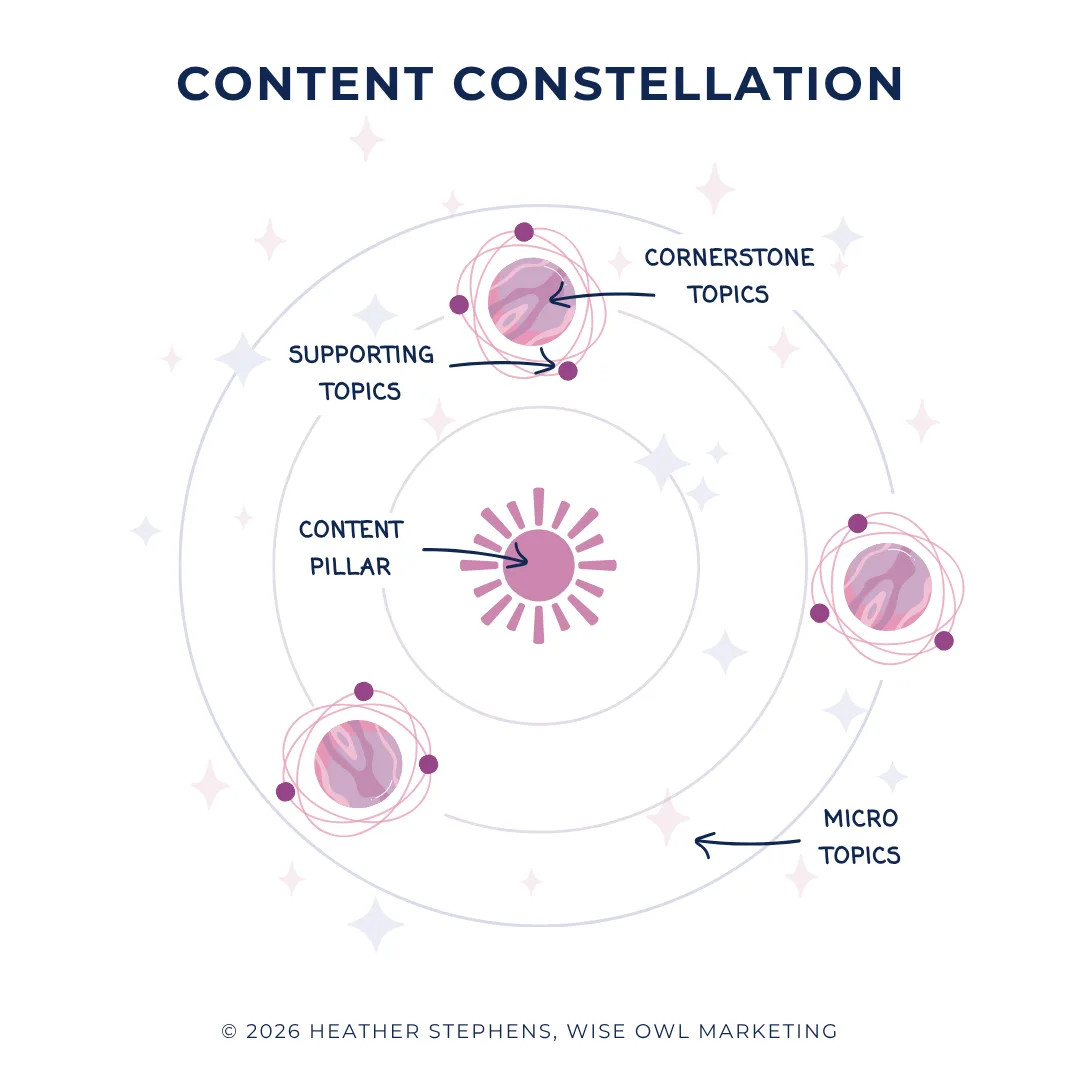
The Content Constellation: How to Stop Wondering What to Post
Most content advice tells you to publish consistently. Almost none tells you what to publish about. The content constellation answers the second question.
Read →
How to Get Clients Without Social Media: 12 Proven Strategies for Coaches that Work in 2026
Coaches: you don't need social media if you hate it. Discover 12 strategies to get clients without social media to grow your coaching business 2026.
Read →
Accessible Website Colors That Win Clients (and Pass WCAG)
Boost conversions, SEO, and credibility with accessible website colors. Learn how to choose high-contrast palettes that pass WCAG standards.
Read →
Should You Start a Business Blog in 2026 to Get Clients?
Should you start a business blog in 2026 to get clients? Yes. Discover why blogging gets more clients and produces higher ROI than social media!
Read →
The AI SEO Glossary for Coaches
A free AI SEO glossary: quick, plain-English definitions of the search and AI terms that keep turning up, written for people who would rather be working.
Read →
The Email Marketing Glossary for Coaches
An email marketing glossary in plain English: the terms that turn up in every tool and course, defined clearly so you can get on with the actual work.
Read →
22 Compelling Reasons to Start a YouTube Channel for Your Business
22 real reasons to start a YouTube channel for your coaching or service business, what it takes to begin, and how to keep going when you feel behind.
Read →
Boost Your Business Blog: The Best Time to Publish Blog Posts
Which is the best day to publish your blog? Does the time to publish blog posts matter? Read to discover the best time to post a blog, according to stats!
Read →Say it clearly
8 postsSay what you do so clearly that the right person recognises themselves in it.

The Importance of Clarity in Marketing
A lack of clarity in marketing wastes an enormous amount of time. Here is how to work out what you do, and say it so the right people recognise it.
Read →
Tell Your Business Origin Story to Connect with Ideal Clients
Telling your origin story helps readers feel connected to you, which makes them far more receptive to what you offer. Here is how to tell it properly.
Read →
How to Implement Personality Marketing with Your Ideal Client
Want to attract exactly the right clients? Here is how to implement personality marketing, using the Enneagram triads, without pigeonholing anybody.
Read →
Content Writing Tip: Display Your Core Values
When you are building a following for your business, people need something to rally around. Displaying your core values is a simple, powerful way to do it.
Read →
Neuroscience for Better Copywriting
Writing copy that influences decisions ultimately comes down to manipulating how the brain fires. Let's leverage neuroscience for better copywriting!
Read →
Brand Colors and Color Meaning: A Beginner's Color Theory Guide for Impactful Branding and Website Design
Use the brand color wheel to choose colors for your business, see what each color means to your customers, and learn where to use them on your site.
Read →
The Coach's Guide to Planning a Branding Photoshoot for Your Website and Marketing
How to plan a branding photoshoot for your website and marketing, so you come away with images you will actually use instead of a folder you never open.
Read →Persuasion in Marketing: How to Influence Without Pressure
Persuasion in marketing helps someone see the value of what you offer. Manipulation gets them to act against their own interest. Here is the difference.
Read →Content that keeps working
16 postsWrite it once. Let it earn for years while you get on with your life.

Seasonal Content Planning: Map a Year of Content in One Sitting
Seasonal content planning made simple: map a whole year in one sitting so slow months and Black Friday stop sneaking up on you. The big-rocks method I use.
Read →The Content Constellation: How to Stop Wondering What to Post
Most content advice tells you to publish consistently. Almost none tells you what to publish about. The content constellation answers the second question.

2026 Marketing Calendar for Coaches: Monthly Themes, Holidays & Content Ideas (Without the Hustle)
Free 2026 marketing calendar for coaches: monthly themes, key dates, hashtag holidays, and a traffic-light guide to when promoting is (and isn't) okay.
Read →
Best Blog Post Ideas for Coaches: 12 Proven Methods for 2026
Stop struggling with blog post ideas. Discover 12 proven methods help coaches quickly generate endless blog post ideas that attract clients.
Read →
How to Write a Blog Post That People Actually Read
Can you write a blog post that feeds your bottom line? Today, you're going to learn how to write blog articles that persuade readers to become buyers.
Read →Boost Your Business Blog: The Best Time to Publish Blog Posts
Which is the best day to publish your blog? Does the time to publish blog posts matter? Read to discover the best time to post a blog, according to stats!
Read →
How to Choose the Right Keyword for a Blog Post
Today I'm going to show you how to choose the right keyword for your next blog post. It is a simple 3 step process you can use to generate blog ideas!
Read →
Long-Form Content for Coaches: How One Blog Per Week Builds a Business That Works While You Rest [2026 Guide]
Long-form content for coaches: Create one piece per week that attracts clients for years. Includes peaceful marketing tips, AI tools, and templates
Read →Should You Start a Business Blog in 2026 to Get Clients?
Should you start a business blog in 2026 to get clients? Yes. Discover why blogging gets more clients and produces higher ROI than social media!
Read →
Consistent Content Creation: Attract New Clients with One Piece of Content Per Week
Create quality content consistently: Master the art of consistent content creation to grow your coaching business without being a pro content creator.
Read →
Content Repurposing: Get More From What You Already Made
Content repurposing lets you get far more from the work you have already done. Here is how to reuse a single piece properly, without sounding repetitive.
Read →
7 Tips to Crush Content Creation Overwhelm and Create Content with Ease
End content creation overwhelm. Seven practical tips to create content with ease, stay consistent, and stop dreading the blank page every single week.
Read →What Is Genius Content?
Anyone can generate an article on your topic in seconds. Nobody else can write yours. What counts as Genius Content, and where the topics come from.
Read →
The Marketing Glossary for Coaches, in Plain English
The ultimate marketing, business, and design glossary is designed to help coaches and service business owners learn the language of business.
Read →The AI SEO Glossary for Coaches
A free AI SEO glossary: quick, plain-English definitions of the search and AI terms that keep turning up, written for people who would rather be working.
Read →The Email Marketing Glossary for Coaches
An email marketing glossary in plain English: the terms that turn up in every tool and course, defined clearly so you can get on with the actual work.
Read →Get in front of people
13 postsPick one place to be visible, go deep, and borrow a stage when you can.
Getting Comfortable on Camera: My 12-Week YouTube Challenge
Documenting my quest to get comfortable on camera. Recording weekly YouTube livestreams for 12 weeks. No edits or do-overs. I'm sharing my updates here.
Read →Marketing Bundles for List Building: A Coach's Guide
How marketing bundles really work, what saying yes costs you, how to tell a well-run one from a junky one, and whether the paid upgrade is worth the money.
Read →
22 Lead Magnet Ideas for Coaches: The Complete Guide to Growing Your Email List in 2026
22 lead magnet ideas for coaches with the conversion rate for each one and a free ChatGPT prompt to build it, so you can pick the one worth your time.
Read →
50+ Lead Magnet Ideas for Health Coaches: From Static PDFs to AI-Powered Tools [2026 Guide]
Free list of 50+ lead magnet examples for health coaches, with sourced conversion rates for each type, so you can see which are worth building first.
Read →
Creative Lead Magnet Ideas That Are Not Another PDF
How do you really get the attention of potential clients? With a lead magnet. Here's a great example of a creative lead magnet from a winery.
Read →
How to Deliver & Promote Your Lead Magnet
Knowing how to promote your lead magnet matters as much as creating the right opt-in offer. Here is how to deliver it, and how to get it seen.
Read →
Email Marketing for Coaches: Where to Actually Start
Email marketing vs social media: which grows your coaching business faster? Discover which channel delivers better ROI and more clients. Find out now!
Read →22 Compelling Reasons to Start a YouTube Channel for Your Business
22 real reasons to start a YouTube channel for your coaching or service business, what it takes to begin, and how to keep going when you feel behind.
Read →
A Practical Guide to Social Media Marketing
Social media marketing is more than post and pray. Let's create a social media marketing strategy that can benefit your business's bottom line.
Read →How to Get Clients Without Social Media: 12 Proven Strategies for Coaches that Work in 2026
Coaches: you don't need social media if you hate it. Discover 12 strategies to get clients without social media to grow your coaching business 2026.
Read →
SEO Marketing Strategy: Why SEO Is Still Worth Your Time
Are you creating an SEO Marketing Strategy for your business? If you're not, this post will give you 10 reasons why to focus on search engine optimization.
Read →
SEO Resources for Coaches: Tools, Guides and Tips That Work
Curated SEO resources to help coaches and service providers improve their search engine rankings. Tools, guides, and tips for better visibility.
Read →
How to Get More Website Traffic Without Being Everywhere
You could have the best conversion focused website design, but if you have no website traffic and no one sees it, you will still struggle to get results.
Read →Working on something else this week? Start where you are.
Get peaceful marketing ideas delivered to your inbox each week.
One practical idea at a time, written like a note from a friend who happens to know marketing. Read it and try it that afternoon.